SSA and Tardies
3 times, then referral
Phones should be used for classwork only. If your phone is visible, you should be able to explain how you are using it for class work.
Headphones, earbuds, etc. are not allowed in class.
Bathroom pass_sign out and sign back in
ADC/ACT word in sketchbook
http://stevecampbellhillwood.blogspot.com/2016/08/vocabulary-paper-sketchbook_22.html
Go to stevecampbellhillwood.blogspot.com
Bookmark this site
Standards:
1) Demonstrate the ability to comply with personal and environmental safety practices associated with art and design applications: the use of adhesives; hand tools; machines; and the handling, storage, and disposal of chemicals/materials in accordance with local, state, and federal safety and environmental regulations. Complete a safety test with 100 percent accuracy.
6) Categorize and describe the principles of design.
7) Analyze the elements of design by evaluating their purposes and applications in a variety of design applications.
8) Research rules of composition (such as the rule of thirds) and explain how the rules govern the elements and principles of design.
23) Apply the design process to complete projects of increasing complexity and of varying applications such as print, web, film, and marketing communications.
What I want you to know or do:
1. Create and save a Photoshop document correctly. (Correct size and into a folder)
2. Communicate the meaning of the art elements and principles of design.
3. Use Photoshop tools correctly
What I want you to do today:
1. Open Photoshop
Open this document (or create one if you have not).
Name: Art Elements
Width: 17 inches
Height: 11 inches
Resolution: 72
Color Mode: RGB Color
Background Contents: White
Save it into the portfolio folder or onto your desktop and drag it into your portfolio folder.
File>Save As
Find an image of a geometric shape
Place this image in your Photoshop document.
If you want to resize in proportion, press and hold shift, and drag from a corner.
You will probably be on the Move Tool already.
If not select it. Where is the Move Tool?
Check Auto Select>Layer
Move the image if you want to.
Go to the Horizontal Type Tool. Where is it?
For your typeface, choose Helvetica, regular, 14 pt. You choose the color.
Click hold and drag to make a text box, about the same size as the image you have just placed.
Go to the Navigator tool.
Window>Navigator. This at the very top Photoshop menu.
Click on the "mountains" to make your document view larger or smaller.
Type: Shape: an art element described as two-dimensional and enclosing an area. Shape can be divided into two basic classes - geometric (rectangle, circle, triangle) and organic (irregular in outline)
Move the text box with the Move Tool if you want to.
Arrange Shape, Geometric Shape, and Organic Shape together.
Save this into your Portfolio folder.
Finish this assignemnt by adding the following. Use images and definitions as you have with the other art elements.
Space: an art element that indicates areas in a drawing (positive and negative) and/or the feeling of depth in a two-dimensional work of art.
Positive space-the objects depicted in a work of art, as opposed to the background or area around the objects.
Negative space-the area around the objects in artwork, often called the background.
Show all three, space, positive space and negative space
Texture: an art element that refers to the surface quality as being rough, smooth, soft, etc. It can be actual or implied.
Value: an art element that refers to the lightness or darkness of a color or shade.
Use a value scale
Color: an art element that indicates natural and manufactured objects as being red, yellow, green or any other name that identifies their hues. Hue is another name for color.
Use a color wheel.
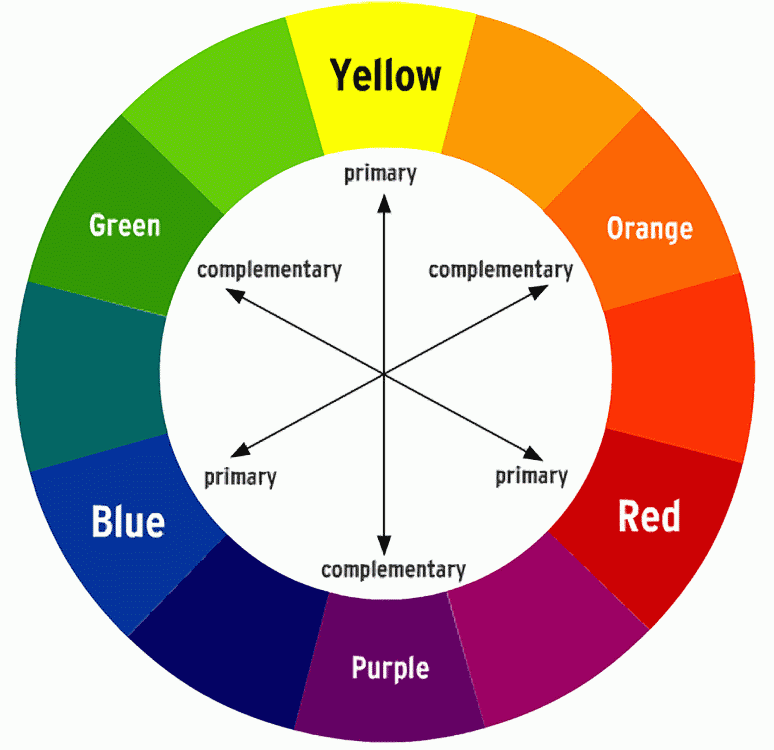
To finish, arrange all the art elements and definitions together so that someone looking at you document would understand what the art elements are. You will need to move and resize.
Saturday, September 10, 2016
August 29_September 2_Art Elements collage
SSA and Tardies
3 times, then referral
Phones should be used for classwork only. If your phone is visible, you should be able to explain how you are using it for class work.
Headphones, earbuds, etc. are not allowed in class.
Return signed forms
Bathroom pass_sign out and sign back in
ADC/ACT word in sketchbook
http://stevecampbellhillwood.blogspot.com/2016/08/vocabulary-paper-sketchbook_22.html
Check your grades
Log on to computers
Go to stevecampbellhillwood.blogspot.com
Bookmark this site
Standards:
1) Demonstrate the ability to comply with personal and environmental safety practices associated with art and design applications: the use of adhesives; hand tools; machines; and the handling, storage, and disposal of chemicals/materials in accordance with local, state, and federal safety and environmental regulations. Complete a safety test with 100 percent accuracy.
6) Categorize and describe the principles of design.
7) Analyze the elements of design by evaluating their purposes and applications in a variety of design applications.
8) Research rules of composition (such as the rule of thirds) and explain how the rules govern the elements and principles of design.
23) Apply the design process to complete projects of increasing complexity and of varying applications such as print, web, film, and marketing communications.
What I want you to know or do:
1. Create and save a Photoshop document correctly. (Correct size and into a folder)
2. Communicate the meaning of the art elements and principles of design.
3. Make 100 on safety quizzes.
Make another desktop folder
Your first name and last name_portfolio
What I want you to do today:
1. Open Photoshop
Open this document (or create one if you have not).
Name: Art Elements
Width: 17 inches
Height: 11 inches
Resolution: 72
Color Mode: RGB Color
Background Contents: White
Save it into the portfolio folder or onto your desktop and drag it into your portfolio folder.
File>Save As
Find an image of an organic shape
Place this image in your Photoshop document.
If you want to resize in proportion, press and hold shift, and drag from a corner.
Find an image of line
Place this image in your Photoshop document.
If you want to resize in proportion, press and hold shift, and drag from a corner.
You will probably be on the Move Tool already.
If not select it. Where is the Move Tool?
Check Auto Select>Layer
Move the image if you want to.
Go to the Horizontal Type Tool. Where is it?
For your typeface, choose Helvetica, regular, 14 pt. You choose the color.
Click hold and drag to make a text box, about the same size as the line image.
Go to the Navigator tool.
Window>Navigator. This at the very top Photoshop menu.
Click on the "mountains" to make your document view larger or smaller.
Type: Organic shapes: shapes that have less well-defined edges as than geometric shapes. They are unpredictable and flowing.
Move the text box with the Move Tool if you want to.
Type: Line. The path made by a moving point.
Move the text box with the Move Tool if you want to.
Save this into your Portfolio folder.
Study for Classroom Safety quiz.
http://stevecampbellhillwood.blogspot.com/2012/08/classroom-safety-test-review.html
Take quiz and make 100.
Study for Computer Safety quiz
http://stevecampbellhillwood.blogspot.com/2014/08/computer-safety-powerpoint.html
Take Computer Safety quiz
You must make 100. You will retake until you do.
3 times, then referral
Phones should be used for classwork only. If your phone is visible, you should be able to explain how you are using it for class work.
Headphones, earbuds, etc. are not allowed in class.
Return signed forms
Bathroom pass_sign out and sign back in
ADC/ACT word in sketchbook
http://stevecampbellhillwood.blogspot.com/2016/08/vocabulary-paper-sketchbook_22.html
Check your grades
Log on to computers
Go to stevecampbellhillwood.blogspot.com
Bookmark this site
Standards:
1) Demonstrate the ability to comply with personal and environmental safety practices associated with art and design applications: the use of adhesives; hand tools; machines; and the handling, storage, and disposal of chemicals/materials in accordance with local, state, and federal safety and environmental regulations. Complete a safety test with 100 percent accuracy.
6) Categorize and describe the principles of design.
7) Analyze the elements of design by evaluating their purposes and applications in a variety of design applications.
8) Research rules of composition (such as the rule of thirds) and explain how the rules govern the elements and principles of design.
23) Apply the design process to complete projects of increasing complexity and of varying applications such as print, web, film, and marketing communications.
What I want you to know or do:
1. Create and save a Photoshop document correctly. (Correct size and into a folder)
2. Communicate the meaning of the art elements and principles of design.
3. Make 100 on safety quizzes.
Make another desktop folder
Your first name and last name_portfolio
What I want you to do today:
1. Open Photoshop
Open this document (or create one if you have not).
Name: Art Elements
Width: 17 inches
Height: 11 inches
Resolution: 72
Color Mode: RGB Color
Background Contents: White
Save it into the portfolio folder or onto your desktop and drag it into your portfolio folder.
File>Save As
Find an image of an organic shape
Place this image in your Photoshop document.
If you want to resize in proportion, press and hold shift, and drag from a corner.
You will probably be on the Move Tool already.
If not select it. Where is the Move Tool?
Check Auto Select>Layer
Move the image if you want to.
Go to the Horizontal Type Tool. Where is it?
For your typeface, choose Helvetica, regular, 14 pt. You choose the color.
Click hold and drag to make a text box, about the same size as the line image.
Go to the Navigator tool.
Window>Navigator. This at the very top Photoshop menu.
Click on the "mountains" to make your document view larger or smaller.
Type: Organic shapes: shapes that have less well-defined edges as than geometric shapes. They are unpredictable and flowing.
Move the text box with the Move Tool if you want to.
Save this into your Portfolio folder.
Take quiz and make 100.
Monday, September 5, 2016
sept 7_9
SSA and Tardies
3 times, then referral
Phones should be used for classwork only. If your phone is visible, you should be able to explain how you are using it for class work.
Headphones, earbuds, etc. are not allowed in class.
Return signed forms
Bathroom pass_sign out and sign back in
ADC/ACT word in sketchbook
http://stevecampbellhillwood.blogspot.com/2016/08/vocabulary-paper-sketchbook_22.html
Go to stevecampbellhillwood.blogspot.com
Bookmark this site
Standards:
1) Demonstrate the ability to comply with personal and environmental safety practices associated with art and design applications: the use of adhesives; hand tools; machines; and the handling, storage, and disposal of chemicals/materials in accordance with local, state, and federal safety and environmental regulations. Complete a safety test with 100 percent accuracy.
6) Categorize and describe the principles of design.
7) Analyze the elements of design by evaluating their purposes and applications in a variety of design applications.
8) Research rules of composition (such as the rule of thirds) and explain how the rules govern the elements and principles of design.
23) Apply the design process to complete projects of increasing complexity and of varying applications such as print, web, film, and marketing communications.
What I want you to know or do:
1. Create and save a Photoshop document correctly. (Correct size and into a folder)
2. Communicate the meaning of the art elements and principles of design.
3. Use Photoshop Tools correctly
What I want you to do today:
1. Open Photoshop
Open this document (or create one if you have not).
Name: Art Elements
Width: 17 inches
Height: 11 inches
Resolution: 72
Color Mode: RGB Color
Background Contents: White
Save it into the portfolio folder or onto your desktop and drag it into your portfolio folder.
File>Save As
Find an image of a geometric shape
Place this image in your Photoshop document.
If you want to resize in proportion, press and hold shift, and drag from a corner.
You will probably be on the Move Tool already.
If not select it. Where is the Move Tool?
Check Auto Select>Layer
Move the image if you want to.
Go to the Horizontal Type Tool. Where is it?
For your typeface, choose Helvetica, regular, 14 pt. You choose the color.
Click hold and drag to make a text box, about the same size as the geometric shape image.
Go to the Navigator tool.
Window>Navigator. This at the very top Photoshop menu.
Click on the "mountains" to make your document view larger or smaller.
Type: Geometric Shapes: Circles, rectangles, squares, triangles. They have the clear edges one achieves when using tools to create them.
Also type: Shape: An art element described as two-dimensional and enclosing an area.
Then: Use the Move Tool to place Shape, Geometric Shape and Organic Shape together or close to one another.
Save this into your Portfolio folder.
3 times, then referral
Phones should be used for classwork only. If your phone is visible, you should be able to explain how you are using it for class work.
Headphones, earbuds, etc. are not allowed in class.
Return signed forms
Bathroom pass_sign out and sign back in
ADC/ACT word in sketchbook
http://stevecampbellhillwood.blogspot.com/2016/08/vocabulary-paper-sketchbook_22.html
Go to stevecampbellhillwood.blogspot.com
Bookmark this site
Standards:
1) Demonstrate the ability to comply with personal and environmental safety practices associated with art and design applications: the use of adhesives; hand tools; machines; and the handling, storage, and disposal of chemicals/materials in accordance with local, state, and federal safety and environmental regulations. Complete a safety test with 100 percent accuracy.
6) Categorize and describe the principles of design.
7) Analyze the elements of design by evaluating their purposes and applications in a variety of design applications.
8) Research rules of composition (such as the rule of thirds) and explain how the rules govern the elements and principles of design.
23) Apply the design process to complete projects of increasing complexity and of varying applications such as print, web, film, and marketing communications.
What I want you to know or do:
1. Create and save a Photoshop document correctly. (Correct size and into a folder)
2. Communicate the meaning of the art elements and principles of design.
3. Use Photoshop Tools correctly
What I want you to do today:
1. Open Photoshop
Open this document (or create one if you have not).
Name: Art Elements
Width: 17 inches
Height: 11 inches
Resolution: 72
Color Mode: RGB Color
Background Contents: White
Save it into the portfolio folder or onto your desktop and drag it into your portfolio folder.
File>Save As
Find an image of a geometric shape
Place this image in your Photoshop document.
If you want to resize in proportion, press and hold shift, and drag from a corner.
You will probably be on the Move Tool already.
If not select it. Where is the Move Tool?
Check Auto Select>Layer
Move the image if you want to.
Go to the Horizontal Type Tool. Where is it?
For your typeface, choose Helvetica, regular, 14 pt. You choose the color.
Click hold and drag to make a text box, about the same size as the geometric shape image.
Go to the Navigator tool.
Window>Navigator. This at the very top Photoshop menu.
Click on the "mountains" to make your document view larger or smaller.
Type: Geometric Shapes: Circles, rectangles, squares, triangles. They have the clear edges one achieves when using tools to create them.
Also type: Shape: An art element described as two-dimensional and enclosing an area.
Then: Use the Move Tool to place Shape, Geometric Shape and Organic Shape together or close to one another.
Monday, August 22, 2016
adc words in paper sketchbook
•Illustrate the meaning of the word with a drawing, or...........
write a sentence using the word.
•Your pages should look something like this.
•Try to get at least 4 words per page.
•Continue to divide up following pages, front and back, throughout your sketchbook.
Vocabulary that may be on the semester exam
Exam
Line: The path made by a moving point
Exam question:
Rule of thirds: The basic principle behind the rule of thirds is to imagine breaking an image down into thirds (both horizontally and vertically) so that you have 9 parts.
Emphasis: to make a part of the the artwork or photo stand out more than others. You can do this by large vs. small, light vs. dark, a bright color among dull, etc.
In another rectangle, show emphasis using light vs. dark. Write "emphasis" in the rectangle.
ADC words
Exam questions:
Shape: an art element described as two-dimensional and enclosing an area.
Geometric shapes: Circles, rectangles, squares, triangles and so on - have the clear edges one achieves when using tools to create them.
Organic shapes: Are shapes with a natural look and a flowing and curving appearance. Organic shapes are associated with things from the natural world, like plants and animals.
ADC word
Exam question
Compositing: combine (two or more images) to make a single picture, especially electronically.
"photographic compositing by computer"
ACT word
Ambient
Exam question:
Ambient light is the light that exists in a scene. Also referred to as “natural light” or “existing light,” ambient light can be the found light inside a home, a restaurant or concert hall, or a bright, sunny day, a deep foggy day, a city at night…in other words, any kind of pre-existing light. This is found light, not additional light that you, the photographer, might choose to add, such as flash. When photographing a scene that is lit with any kind of ambient light, you need to use a light meter to determine exposure.
Saturday, August 13, 2016
August 15_19
Today:
Let me see your folders, with sketchbooks inside
Return signed forms
Bathroom pass_sign out and sign back in
ADC word in sketchbook
Log on to computers
Go to stevecampbellhillwood.blogspot.com
Bookmark this site
Make a desktop folder if you have not
Your first name and last name_sketchbook
Open Photoshop
On page 1, place and resize another photo
Hold Shift and drag from a corner
Arrange 3 photos on one page.
Save it into the sketchbook folder.
Study for Computer Safety quiz
http://stevecampbellhillwood.blogspot.com/2014/08/computer-safety-powerpoint.html
Take Computer Safety quiz
You must make 100. You will retake until you do.
Phones should be used for classwork only. If your phone is visible, you should be able to explain how you are using it for class work.
Headphones, earbuds, etc. are not allowed in class.
Return signed forms
Bathroom pass_sign out and sign back in
ADC word in sketchbook
Go to stevecampbellhillwood.blogspot.com
Bookmark this site
Make a desktop folder if you have not
Your first name and last name_sketchbook
Open Photoshop
On page 1, place and resize another photo
Hold Shift and drag from a corner
Arrange 3 photos on one page.
Save it into the sketchbook folder.
Study for Computer Safety quiz
http://stevecampbellhillwood.blogspot.com/2014/08/computer-safety-powerpoint.html
Take Computer Safety quiz
You must make 100. You will retake until you do.
Sunday, August 7, 2016
photoshop CS6 creative cloud tools
To see Photoshop Tools, click here
https://helpx.adobe.com/photoshop/using/tools.html
To find missing Tools, click here
https://helpx.adobe.com/photoshop/kb/bringing-back-tools.html
https://helpx.adobe.com/photoshop/using/tools.html
To find missing Tools, click here
https://helpx.adobe.com/photoshop/kb/bringing-back-tools.html
Thursday, August 4, 2016
Subscribe to:
Posts (Atom)


